Published
- 2 min read
CPE263 Week 4
Week 4
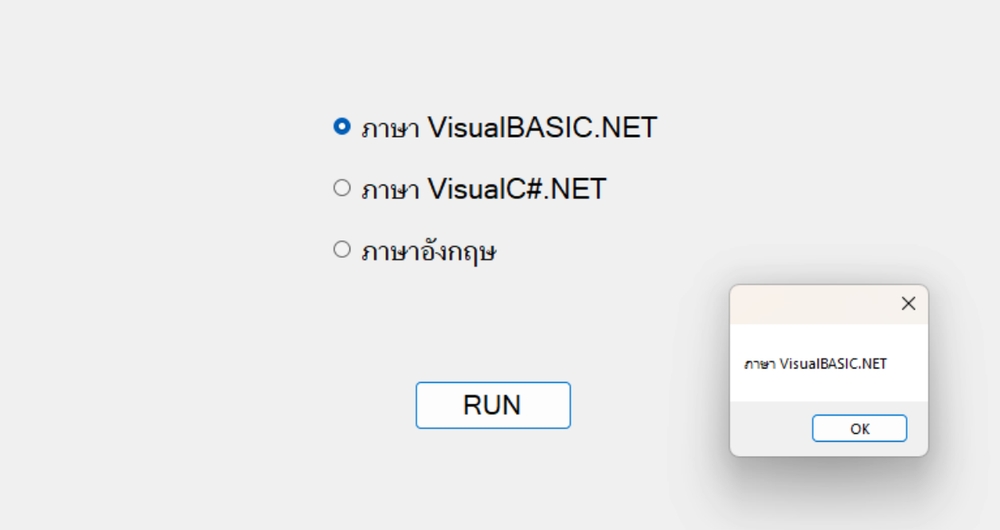
In C#, a RadioButton is a control that allows users to select a single option from a set of choices. Multiple RadioButtons are grouped together, typically within a GroupBox or a Panel, so that only one button can be selected at a time.
RadioButton
Project 1
       using System;
using System.Collections.Generic;
using System.ComponentModel;
using System.Data;
using System.Drawing;
using System.Linq;
using System.Text;
using System.Threading.Tasks;
using System.Windows.Forms;

namespace WindowsFormsApp1
{
    public partial class Form1 : Form
    {
        public Form1()
        {
            InitializeComponent();
        }

        private void btnRUN_Click(object sender, EventArgs e)
        {
            if (rad1.Checked == true)
                MessageBox.Show(rad1.Text);
            else if (rad2.Checked == true)
                MessageBox.Show(rad2.Text);
            else
                MessageBox.Show(rad3.Text);

        }
    }
}
CheckBox
In C#, a CheckBox is a control that allows users to select or unselect an option. Unlike RadioButtons, CheckBoxes are independent of one another, so the user can check multiple options at the same time.
Project 2
       using System;
using System.Collections.Generic;
using System.ComponentModel;
using System.Data;
using System.Drawing;
using System.Linq;
using System.Text;
using System.Threading.Tasks;
using System.Windows.Forms;

namespace WindowsFormsApp2
{
    public partial class Form1 : Form
    {
        public Form1()
        {
            InitializeComponent();
        }

        private void btnRUN_Click(object sender, EventArgs e)
        {
            string ans = "";
            if (checkBox1.Checked == true)
                ans += checkBox1.Text + "\r\n";
            if (checkBox2.Checked == true)
                ans += checkBox2.Text + "\r\n";
            if (checkBox3.Checked == true)
                ans += checkBox3.Text + "\r\n";
            if (checkBox4.Checked == true)
                ans += checkBox4.Text + "\r\n";
            if (checkBox5.Checked == true)
                ans += checkBox5.Text + "\r\n";

            txtAns.Text = ans.ToString();
        }
    }
}
if..else condition
Project 3
       using System;
using System.Collections.Generic;
using System.ComponentModel;
using System.Data;
using System.Drawing;
using System.Linq;
using System.Text;
using System.Threading.Tasks;
using System.Windows.Forms;

namespace WindowsFormsApp3
{
    public partial class Form1 : Form
    {
        public Form1()
        {
            InitializeComponent();
        }

        private void btnRUN_Click(object sender, EventArgs e)
        {
            int n1, n2, n3, min, max, med;
            n1 = Convert.ToInt16(textBox1.Text);
            n2 = Convert.ToInt16(textBox2.Text);
            n3 = Convert.ToInt16(textBox3.Text);

            max = n1;
            if (n2 > max)
                max = n2;
            if (n3 > max)
                max = n3;

            min = n1;
            if (n2 < min )
                min = n2;
            if(n3 < min)
                min = n3;

            if ((n1 > min && n1 < max) || (n1 < max && n1 > min))
                med = n1;
            else if ((n2 > min && n2 < max) || (n2 < max && n2 > min))
                med = n2;
            else
                med = n3;


            MessageBox.Show("min : \t" + min.ToString() +
                            "\nmax : \t" + max.ToString() +
                            "\nmed : \t" + med.ToString());
        }
    }
}